Running Containerised Batch Jobs on Google Cloud Platform

Running Containerised Batch Jobs on Google Cloud Platform
I needed to OCR tens of thousands of Sri Lankan Hansard PDFs each over 100 pages, quickly, reliably and without managing infrastructure. This guide walks through how I used GCP Batch to build a fully parallel, fault-tolerant pipeline.
Google Cloud credits are provided for this project.
Table of Contents
- Overview & Architecture
- Prerequisites
- Project Setup
- Storing Data in Cloud Storage
- Writing the Worker Script
- Containerising with Docker
- Pushing the Image to Artifact Registry
- Submitting the Batch Job
- Monitoring & Debugging
- Common Pitfalls & Fixes
1. Overview & Architecture
What is GCP Batch?
GCP Batch is a fully managed service that provisions VMs, runs your containerised workload across them in parallel, and tears everything down automatically. It is ideal for:
- Large-scale data processing (OCR, transcription, ML inference)
- Scientific simulations
- Rendering pipelines
- Any task that can be split into independent units of work
How it works
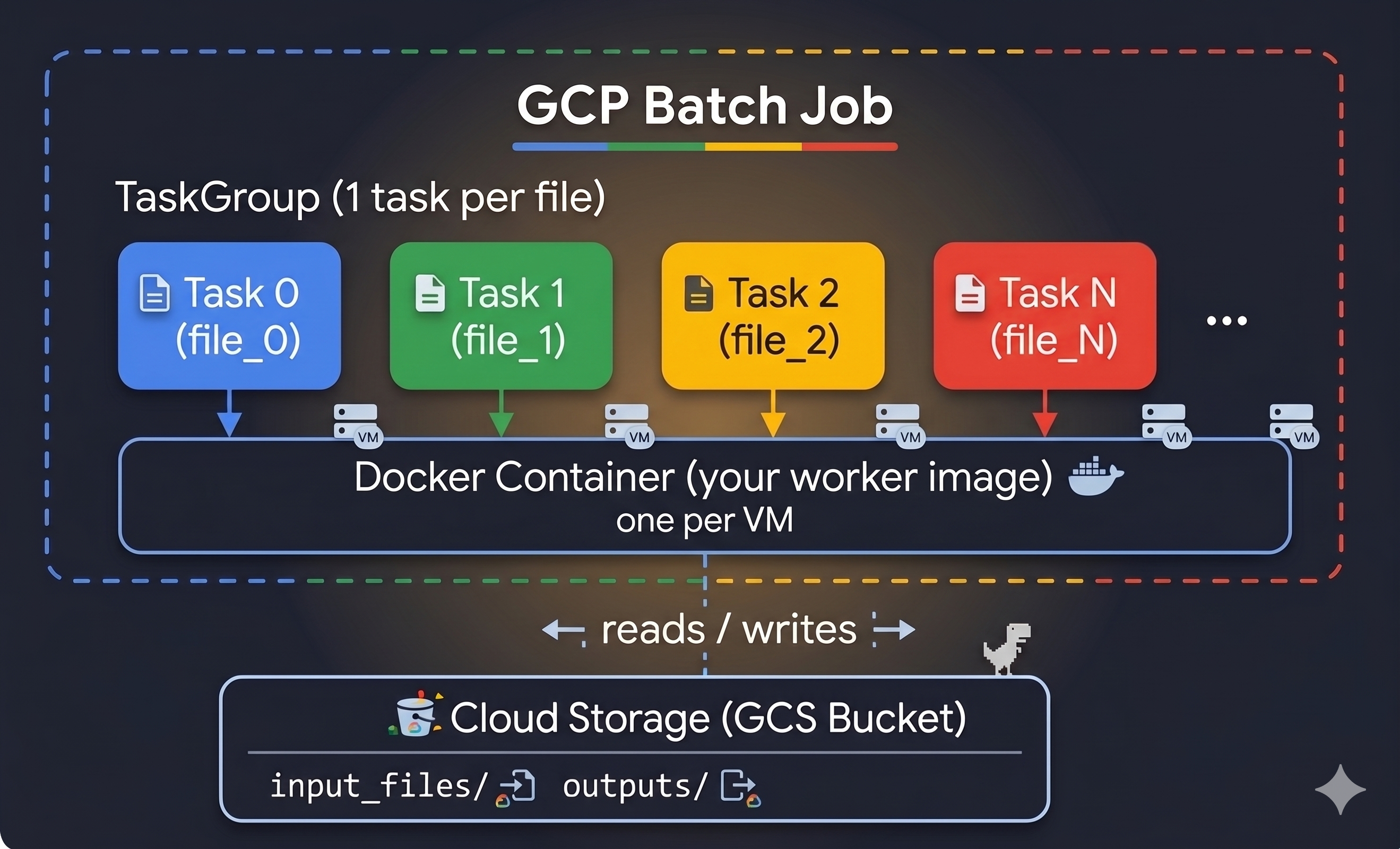
Each task gets a unique BATCH_TASK_INDEX environment variable (0, 1, 2, …, N−1). Your worker uses this index to look up which file it should process from a manifest stored in GCS.
2. Prerequisites
Tools to install
| Tool | Purpose | Install |
|---|---|---|
gcloud CLI |
Manage GCP resources | cloud.google.com/sdk |
docker |
Build & push container images | docs.docker.com |
| Python 3.10+ | Run the job-submission script | python.org |
Python packages
pip install google-cloud-storage google-cloud-batch
Authenticate gcloud
gcloud auth login
gcloud auth application-default login   # lets Python SDKs use your credentials
gcloud config set project YOUR_PROJECT_ID
3. Project Setup
Enable the required APIs
gcloud services enable \
  batch.googleapis.com \
  artifactregistry.googleapis.com \
  storage.googleapis.com \
  logging.googleapis.com
Create an Artifact Registry repository (to store your Docker image)
gcloud artifacts repositories create YOUR_REPO_NAME \
  --repository-format=docker \
  --location=us-central1 \
  --description="Docker images for batch jobs"
Grant the default Compute Service Account access to pull images
GCP Batch VMs use the default Compute Engine service account (PROJECT_NUMBER-compute@developer.gserviceaccount.com). It needs permission to pull your image:
gcloud artifacts repositories add-iam-policy-binding YOUR_REPO_NAME \
  --location=us-central1 \
  --member="serviceAccount:PROJECT_NUMBER-compute@developer.gserviceaccount.com" \
  --role="roles/artifactregistry.reader"
[!TIP] Find your project number with:
gcloud projects describe YOUR_PROJECT_ID --format='value(projectNumber)'
Grant access to Cloud Storage
The same service account needs to read inputs and write outputs:
gsutil iam ch \
  serviceAccount:PROJECT_NUMBER-compute@developer.gserviceaccount.com:roles/storage.objectAdmin \
  gs://YOUR_BUCKET_NAME
4. Storing Data in Cloud Storage
Create a bucket
gsutil mb -l us-central1 gs://YOUR_BUCKET_NAME
Upload your input files
gsutil -m cp -r /local/path/to/pdfs/ gs://YOUR_BUCKET_NAME/input_files/
The manifest pattern
Instead of hardcoding file names in your container, use a manifest file — a plain-text list of all files to process. Each task reads line TASK_INDEX from this file.
input_files/document_001.pdf
input_files/document_002.pdf
input_files/document_003.pdf
...
Your job-submission script generates and uploads this manifest automatically (see Section 8).
5. Writing the Worker Script
The worker is the Python script that runs inside each container. It:
- Reads
BATCH_TASK_INDEXto find its assigned file - Downloads the file from GCS
- Processes it
- Uploads the result back to GCS
# worker.py
import os
import sys
from google.cloud import storage
from multiprocessing import Pool, cpu_count

# ── Environment variables injected by GCP Batch ──────────────────────────────
# BATCH_TASK_INDEX is automatically set by GCP Batch (0, 1, 2, …, N-1).
# INPUT_BUCKET / OUTPUT_BUCKET / OUTPUT_PREFIX are passed via the job definition.

INPUT_BUCKET  = os.environ["INPUT_BUCKET"]
OUTPUT_BUCKET = os.environ["OUTPUT_BUCKET"]
OUTPUT_PREFIX = os.environ.get("OUTPUT_PREFIX", "outputs/")

# IMPORTANT: Use BATCH_TASK_INDEX (not TASK_INDEX) — that is the name GCP Batch injects.
TASK_INDEX = int(os.environ.get("BATCH_TASK_INDEX", os.environ.get("TASK_INDEX", 0)))

storage_client = storage.Client()


def get_target_file():
    """Reads manifest.txt from GCS and returns this task's assigned filename."""
    bucket = storage_client.bucket(INPUT_BUCKET)
    blob   = bucket.blob("manifest.txt")
    lines  = blob.download_as_text().splitlines()
    return lines[TASK_INDEX] if TASK_INDEX < len(lines) else None


def process_page(args):
    """Process a single page and upload result to GCS."""
    page_num, data, base_name = args
    result = do_work(data)                        # ← your processing logic here

    out_bucket = storage_client.bucket(OUTPUT_BUCKET)
    out_blob   = out_bucket.blob(f"{OUTPUT_PREFIX}{base_name}_{page_num}.txt")
    out_blob.upload_from_string(result)
    return f"Page {page_num} done."


def main():
    file_path = get_target_file()
    if not file_path:
        print(f"No file for task index {TASK_INDEX}. Exiting.")
        return

    base_name = os.path.splitext(os.path.basename(file_path))[0]
    local_path = f"/tmp/{os.path.basename(file_path)}"

    # 1. Download input
    print(f"[Task {TASK_INDEX}] Downloading {file_path}...")
    storage_client.bucket(INPUT_BUCKET).blob(file_path).download_to_filename(local_path)

    # 2. Process (parallelise within the VM using all CPUs)
    pages = load_pages(local_path)                # ← your loading logic here
    print(f"[Task {TASK_INDEX}] Processing {len(pages)} pages on {cpu_count()} CPUs...")

    with Pool(cpu_count()) as pool:
        pool.map(process_page, [(i + 1, p, base_name) for i, p in enumerate(pages)])

    # 3. Cleanup
    os.remove(local_path)
    print(f"[Task {TASK_INDEX}] Finished {file_path}")


if __name__ == "__main__":
    main()
[!IMPORTANT] Always use
BATCH_TASK_INDEX, notTASK_INDEX. GCP Batch injects the former automatically. If you read a variable that doesn’t exist, Python raisesKeyErrorand the container exits with code 255 — giving you no useful error message.
6. Containerising with Docker
The Dockerfile
# CRITICAL on Apple Silicon / ARM Macs:
# Always specify --platform=linux/amd64 so the image runs on GCP's x86_64 VMs.
# Without this, you get "exec format error" and exit code 255 with no other hint.
FROM --platform=linux/amd64 python:3.10-slim

# Install system dependencies your processing needs
RUN apt-get update && apt-get install -y \
    your-system-package \
    && apt-get clean

# Install Python dependencies
RUN pip install --no-cache-dir \
    google-cloud-storage \
    your-other-packages

# Copy your worker script
COPY worker.py /worker.py

# The entrypoint is your worker script
ENTRYPOINT ["python", "/worker.py"]
[!WARNING] Apple Silicon (M1/M2/M3/M4) Mac users: Docker builds for your host architecture (
linux/arm64) by default. GCP VMs arelinux/amd64. Always pass--platform=linux/amd64todocker build, and pin it in theFROMline too. Forgetting this causes instant failures with the crypticexec format error.
Build the image
# Always specify --platform when building on a Mac (or any ARM machine)
docker build --platform=linux/amd64 \
  -t us-central1-docker.pkg.dev/YOUR_PROJECT_ID/YOUR_REPO_NAME/YOUR_IMAGE_NAME:latest \
  .
Verify the architecture
docker inspect us-central1-docker.pkg.dev/YOUR_PROJECT_ID/YOUR_REPO_NAME/YOUR_IMAGE_NAME:latest \
  | grep Architecture
# Should print: "Architecture": "amd64"
7. Pushing the Image to Artifact Registry
Configure Docker to authenticate with GCP
gcloud auth configure-docker us-central1-docker.pkg.dev
Push
docker push us-central1-docker.pkg.dev/YOUR_PROJECT_ID/YOUR_REPO_NAME/YOUR_IMAGE_NAME:latest
Verify it’s there
gcloud artifacts docker images list \
  us-central1-docker.pkg.dev/YOUR_PROJECT_ID/YOUR_REPO_NAME/YOUR_IMAGE_NAME
8. Submitting the Batch Job
This script:
- Scans your GCS bucket to build a manifest
- Creates a GCP Batch job with one task per file
# submit_job.py
from google.cloud import storage, batch_v1

# ── Configuration ─────────────────────────────────────────────────────────────
PROJECT_ID    = "YOUR_PROJECT_ID"
REGION        = "us-central1"
JOB_ID        = "my-batch-job"

INPUT_BUCKET  = "YOUR_BUCKET_NAME"   # bucket name ONLY — no gs:// prefix, no path
INPUT_PREFIX  = "input_files/"       # the folder inside the bucket
OUTPUT_BUCKET = "YOUR_BUCKET_NAME"   # can be the same bucket
OUTPUT_PREFIX = "outputs/"           # where results land

IMAGE_URI = (
    f"us-central1-docker.pkg.dev/{PROJECT_ID}"
    "/YOUR_REPO_NAME/YOUR_IMAGE_NAME:latest"
)
# ──────────────────────────────────────────────────────────────────────────────


def prepare_and_submit():
    # ── 1. Build the manifest ─────────────────────────────────────────────────
    gcs = storage.Client(project=PROJECT_ID)
    bucket = gcs.bucket(INPUT_BUCKET)

    files = [
        blob.name
        for blob in bucket.list_blobs(prefix=INPUT_PREFIX)
        if blob.name.lower().endswith(".pdf")   # adjust extension as needed
    ]
    bucket.blob("manifest.txt").upload_from_string("\n".join(files))
    print(f"Manifest created with {len(files)} files.")

    # ── 2. Define the runnable (container + env vars) ─────────────────────────
    runnable = batch_v1.Runnable(
        container=batch_v1.Runnable.Container(image_uri=IMAGE_URI),
        environment=batch_v1.Environment(
            variables={
                "INPUT_BUCKET":  INPUT_BUCKET,
                "OUTPUT_BUCKET": OUTPUT_BUCKET,
                "OUTPUT_PREFIX": OUTPUT_PREFIX,
                # BATCH_TASK_INDEX is injected automatically — do not set it here
            }
        ),
    )

    # ── 3. Define per-task compute resources ──────────────────────────────────
    task_spec = batch_v1.TaskSpec(
        runnables=[runnable],
        compute_resource=batch_v1.ComputeResource(
            cpu_milli=4000,     # 4 vCPUs
            memory_mib=8192,    # 8 GB RAM
        ),
        max_retry_count=1,      # retry once on transient errors (e.g. SPOT preemption)
    )

    # ── 4. Task group — one task per file ─────────────────────────────────────
    group = batch_v1.TaskGroup(
        task_count=len(files),
        task_spec=task_spec,
        parallelism=10,   # how many VMs run simultaneously; tune to your quota
    )

    # ── 5. VM allocation policy ───────────────────────────────────────────────
    # GCP Batch only supports ONE InstancePolicyOrTemplate.
    # Use SPOT (preemptible) for cost savings; set max_retry_count > 0 to handle evictions.
    # Allow all zones in the region so Batch picks one with available SPOT capacity.
    allocation = batch_v1.AllocationPolicy(
        instances=[
            batch_v1.AllocationPolicy.InstancePolicyOrTemplate(
                policy=batch_v1.AllocationPolicy.InstancePolicy(
                    machine_type="n2-standard-4",
                    provisioning_model=batch_v1.AllocationPolicy.ProvisioningModel.SPOT,
                )
            )
        ],
        location=batch_v1.AllocationPolicy.LocationPolicy(
            allowed_locations=[
                "zones/us-central1-a",
                "zones/us-central1-b",
                "zones/us-central1-c",
                "zones/us-central1-f",
            ]
        ),
    )

    # ── 6. Assemble and submit the job ────────────────────────────────────────
    job = batch_v1.Job(
        task_groups=[group],
        allocation_policy=allocation,
        labels={"type": "my-pipeline"},
        # Route container stdout/stderr to Cloud Logging so you can debug failures
        logs_policy=batch_v1.LogsPolicy(
            destination=batch_v1.LogsPolicy.Destination.CLOUD_LOGGING
        ),
    )

    client = batch_v1.BatchServiceClient()
    response = client.create_job(
        request=batch_v1.CreateJobRequest(
            parent=f"projects/{PROJECT_ID}/locations/{REGION}",
            job=job,
            job_id=JOB_ID,
        )
    )
    print(f"Job submitted: {response.name}")


if __name__ == "__main__":
    prepare_and_submit()
Submit it:
python3 submit_job.py
9. Monitoring & Debugging
Check job status
gcloud batch jobs describe MY_JOB_ID \
  --location=us-central1 \
  --project=YOUR_PROJECT_ID
Check an individual task
gcloud batch tasks describe 0 \
  --job=MY_JOB_ID \
  --task_group=group0 \
  --location=us-central1 \
  --project=YOUR_PROJECT_ID
Stream task logs (container stdout/stderr)
Because we set logs_policy = CLOUD_LOGGING, container output goes to Cloud Logging:
gcloud logging read \
  'logName="projects/YOUR_PROJECT_ID/logs/batch_task_logs"' \
  --project=YOUR_PROJECT_ID \
  --limit=50 \
  --format="table(timestamp, textPayload)"
For the Batch agent logs (VM-level events like image pull errors):
gcloud logging read \
  'logName="projects/YOUR_PROJECT_ID/logs/batch_agent_logs"' \
  --project=YOUR_PROJECT_ID \
  --limit=50 \
  --format="table(timestamp, textPayload)"
[!TIP] If
batch_task_logsandbatch_agent_logsdon’t appear in Cloud Logging, it means you forgot to setlogs_policy. Without it, all container output is silently discarded, making debugging nearly impossible.
Delete a failed/cancelled job before resubmitting
GCP Batch job IDs must be unique within a project+region. If you resubmit with the same ID you get a 409 AlreadyExists error.
gcloud batch jobs delete MY_JOB_ID \
  --location=us-central1 \
  --project=YOUR_PROJECT_ID \
  --quiet
Wait for deletion to complete before resubmitting (usually takes ~60 seconds).
10. Common Pitfalls & Fixes
① Exit code 255 — the catch-all failure
Exit code 255 with a sub-second runtime almost never means your code failed. The container didn’t start at all. Check batch_agent_logs for the real reason.
| Actual cause | Symptom in logs | Fix |
|---|---|---|
| Wrong CPU architecture | exec format error / linux/arm64 does not match linux/amd64 |
Rebuild with --platform=linux/amd64 |
| Zone out of SPOT capacity | CODE_GCE_ZONE_RESOURCE_POOL_EXHAUSTED |
Allow all zones in LocationPolicy |
| Image pull failed | pull access denied |
Grant artifactregistry.reader to the Compute SA |
Python KeyError at import |
KeyError: 'TASK_INDEX' |
Use BATCH_TASK_INDEX (see below) |
② Wrong environment variable name for task index
GCP Batch injects the task index as BATCH_TASK_INDEX, not TASK_INDEX.
# ❌ Wrong — raises KeyError, container exits 255 with no useful message
TASK_INDEX = int(os.environ["TASK_INDEX"])

# ✅ Correct
TASK_INDEX = int(os.environ.get("BATCH_TASK_INDEX", os.environ.get("TASK_INDEX", 0)))
③ Passing a GCS path as a bucket name
storage.Client().bucket() takes a bucket name only, not a path.
# ❌ Wrong — "my-bucket/some/prefix" is not a valid bucket name
client.bucket("my-bucket/some/prefix")

# ✅ Correct — separate bucket name from prefix
BUCKET = "my-bucket"
PREFIX = "some/prefix/"
client.bucket(BUCKET).blob(PREFIX + filename)
④ Only one InstancePolicyOrTemplate is allowed
GCP Batch supports exactly one instance policy per job. Passing a list of policies raises 400 InvalidArgument.
# ❌ Wrong — API rejects multiple entries
instances=[policy_a, policy_b, policy_c]

# ✅ Correct — single policy; use LocationPolicy to spread across zones instead
instances=[single_policy]
⑤ Resubmitting with a taken job ID
409 Resource "…/jobs/my-job" already exists
Either delete the old job first, or use a unique ID (e.g. append a timestamp):
import time
JOB_ID = f"my-batch-job-{int(time.time())}"
⑥ No logs appearing in Cloud Logging
Always set logs_policy or container stdout/stderr is silently dropped:
job.logs_policy = batch_v1.LogsPolicy(
    destination=batch_v1.LogsPolicy.Destination.CLOUD_LOGGING
)
⑦ storage.Client() fails with “Project could not be determined”
Pass project explicitly — don’t rely on the environment variable being set:
# ❌ May fail if GOOGLE_CLOUD_PROJECT env var is not set
client = storage.Client()

# ✅ Always works
client = storage.Client(project="YOUR_PROJECT_ID")
Quick Reference Card
# Build (on Mac/ARM — always specify platform)
docker build --platform=linux/amd64 -t REGISTRY/PROJECT/REPO/IMAGE:TAG .

# Push
docker push REGISTRY/PROJECT/REPO/IMAGE:TAG

# Submit job
python3 submit_job.py

# Watch job
gcloud batch jobs describe JOB_ID --location=REGION --project=PROJECT_ID

# See container logs
gcloud logging read 'logName="projects/PROJECT_ID/logs/batch_task_logs"' \
  --project=PROJECT_ID --limit=50

# See agent/VM logs
gcloud logging read 'logName="projects/PROJECT_ID/logs/batch_agent_logs"' \
  --project=PROJECT_ID --limit=50

# Delete job (required before resubmitting with same ID)
gcloud batch jobs delete JOB_ID --location=REGION --project=PROJECT_ID --quiet